We give you the prompts.
With your approval, your AI can install Booking Kit, publish it, and add the verified booking link or embed to your website.
We built the booking engine. You make it fit your business. Start with one of five layouts, connect your calendars and payments, add it to your website, then tell your AI what you want moved, resized, removed, or rebuilt.
Calendar sync. Google Calendar, Outlook.com / Microsoft 365, and Exchange are supported.
Watch Booking Kit become yours
Five templates. Colors. Type. Desktop and mobile.
Colors and logos are the easy part. Your AI can change the layout itself.
Most booking systems charge you every month for as long as you use them. Booking Kit does not.
With your approval, your AI can install Booking Kit, publish it, and add the verified booking link or embed to your website.
Change the design, layout, wording, services, and booking flow. You also decide where your customer data lives. The prepared prompts tell your AI what must keep working.
Keep using and improving your copy without paying KapKit a monthly product fee.
No monthly Booking Kit fee. Online hosting, email, database, calendar, AI, and domain services are separate and may charge their own fees.
Five starting points · No locked theme
Studio, Spotlight, Sidecar, Editorial, and Poster get you moving. They are usable starting points, not cages. These examples use a fictional Pilates studio, hair studio, electrician, home-cleaning company, and restaurant. The photography is AI-generated and the businesses are not customer testimonials.

A calm split-screen Pilates page with the session choice and calendar visible at once.

A photo-led salon page with a compact service menu and a clear path into availability.

A residential electrician page with job-first language, on-site details, and visit windows.

A bright home-cleaning page that separates packages from the scheduling flow.

A restaurant reservation page that starts with party size and ends with a table time.
These are ideas, not limits.
You own the source. Every visible part of the booking page can change. Move the service chooser. Rebuild the hero. Change the booking-flow width. Remove sections. Add sections. Your AI edits the page; the booking engine underneath keeps doing its job.Talk to your software
Give your AI five things. Specific direction beats “make it better” every time.
Say what you sell and who books it.
Name three words the page should evoke.
Say what should move, resize, appear, or disappear.
Name the booking steps that must keep working.
Require tests plus desktop and mobile screenshots.
Open my Booking Kit project and inspect the public booking page first.
My business is [business] and my customers are [customer]. Make the page feel [three adjectives]. Change the layout so [describe what should move, resize, appear, or disappear].
Keep the service, date, time, guest details, payment, confirmation, accessibility, and mobile booking flow working.
Run the existing tests and build. Then take desktop and mobile screenshots and tell me exactly what changed. Ask before installing a package or publishing anything.
Try requests like:
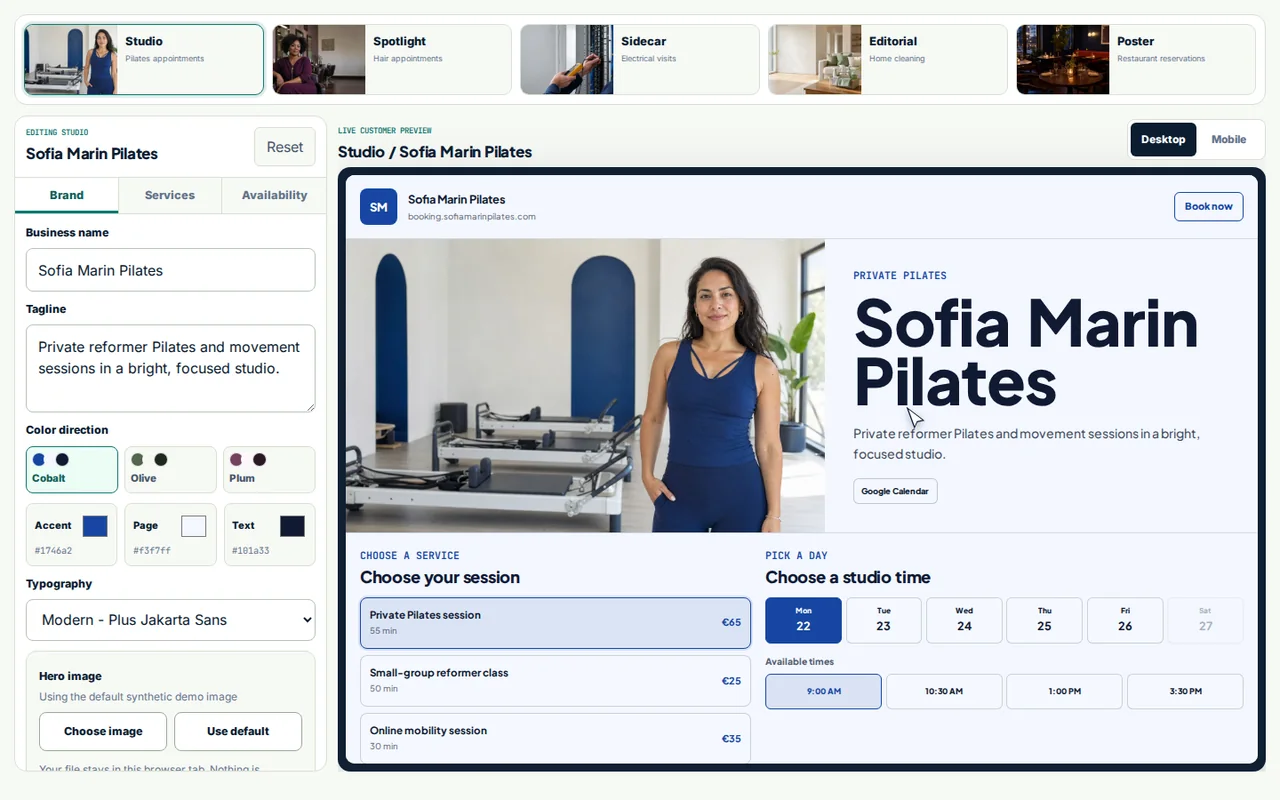
See what customers see
The public demo uses fake business data. Your copy gives you the same customer booking flow plus the owner controls needed to run it.
From purchase to first booking
Your exact setup time depends on the accounts you connect. The guided path keeps the work to one clear action at a time.
Preview the guided setupBuy Booking Kit and download the working software.
Copy one prepared instruction. Your AI handles the technical setup.
Choose a starting point, then tell your AI what should move, shrink, grow, appear, or disappear.
Connect your calendars, turn on payments if needed, test one booking, then link or embed it on your website.
What you get
You are not buying a blank project or a pile of videos. You get the product, the setup path, and the prompts that make the technical work manageable.
Booking Kit software for your own business
Five starting layouts you can rebuild with your AI
Guided setup for a first live page in about an hour, depending on your accounts
Prepared AI prompts for setup, full-layout customization, publishing, and troubleshooting
Owner controls, public booking page, and booking dashboard
12 months of source-update downloads
Lifetime access to the setup and lessons
14-day money-back guarantee before you download, clone, copy, or otherwise access the private source
Before you start
If your AI agent can open files, run commands, and use a browser, follow the guided setup yourself. If it cannot, send the prepared handoff to your developer, IT person, or website person. Booking Kit is not a hosted booking service: you or that helper will own the Netlify, Supabase, and Resend accounts and the resulting deployment.
Booking Kit has no monthly product fee. Online hosting, email, database, calendar, AI, and domain services are separate and may charge their own fees.
Payments are one-time card payments through your own Stripe account. Deposits, subscriptions, coupons, tax, invoices, and refunds are not configured automatically.
Launch price
The standard price is €100. Launch access includes the software, five starting layouts, guided AI setup, private download, 12 months of source updates, lifetime access to the learning material, and a 14-day money-back guarantee before you download, clone, copy, or otherwise access the private source.