Priority workflows
4
Trade-specific starting pointsServiceKit for Landscaping
Landscaping software
Recurring job scheduling and crew dispatch for landscaping companies. Buy once, install with AI, and adapt the workflow.
Run landscaping jobs, customer history, crew changes, and payments in one system you control.
Buying is coming soon. Inspect the finished workflow and ownership model now.
 Owned source
Priority workflows
4
Trade-specific starting pointsJob cycle
Lead to paid
One connected workflowServiceKit seats
$0
No per-seat app chargeWhat is landscaping business software?
Landscaping business software handles the operational side of running a landscaping company: scheduling recurring jobs, dispatching crews to the right properties, tracking time and materials per job, and invoicing clients on your terms. Hosted landscaping software usually bills by plan, add-ons, or users. ServiceKit does the core work for a one-time $349 payment. You own the code. You host it on your own server. No ServiceKit monthly fee, no ServiceKit per-seat charges, no vendor lock-in. When you add a fifth crew member, your software cost stays fixed.
What breaks first
Profit leaks when job details, customer context, scheduling changes, and payment follow-up live in different places.
You have 40 weekly mows, 15 biweekly properties, and a handful of monthly maintenance clients. Managing that in a spreadsheet or your head means missed visits, double-bookings, and angry customers. You need a scheduling system that handles recurring jobs without you manually re-entering them every week.
Every morning starts the same way: figure out which crew goes where, text them the addresses, hope they check their phones. When a job cancels or a new emergency request comes in, you are playing phone tag for 20 minutes. A proper dispatch system assigns crews automatically and updates in real-time.
Spring cleanup invoices get sent three weeks late. Weekly mow billing piles up because nobody has time to generate invoices between jobs. By the time you send them, clients question the charges. You need invoicing that happens the same day as the work, not whenever someone gets around to it.
Most landscaping software charges $15 to $50 per user per month. A 6-person crew costs you $90 to $300/month in software fees alone. That is $1,080 to $3,600 per year, and the price goes up every time you hire. ServiceKit is $349 total. Add 20 users. The price does not change.
Best-fit features
Scheduling
Set up weekly, biweekly, or custom recurring schedules for every property. Drag and drop to reassign. When a client skips a week or adds a service, update once and the schedule adjusts forward. Built for the volume landscapers actually deal with.
Open feature →
Dispatching
Assign crews to properties based on location and availability. When a job cancels or a priority request comes in, reassign in seconds. Crews see their daily route on their phone. No morning text chains, no confusion.
Open feature →
Invoicing & Payments
Generate invoices per visit, per week, or per month. Send Stripe payment links directly to clients. Track who has paid and who is overdue. Stop chasing payments with phone calls and start collecting them automatically.
Open feature →
Client CRM
Every property has a profile: service history, photos, gate codes, special instructions, contact info. When a crew shows up, they know exactly what to do without calling the office. When a client calls, you pull up their full history in seconds.
Open feature →
Product proof
A focused product view makes the promise concrete: the work is not trapped in a rented note, inbox, spreadsheet, or shared calendar.
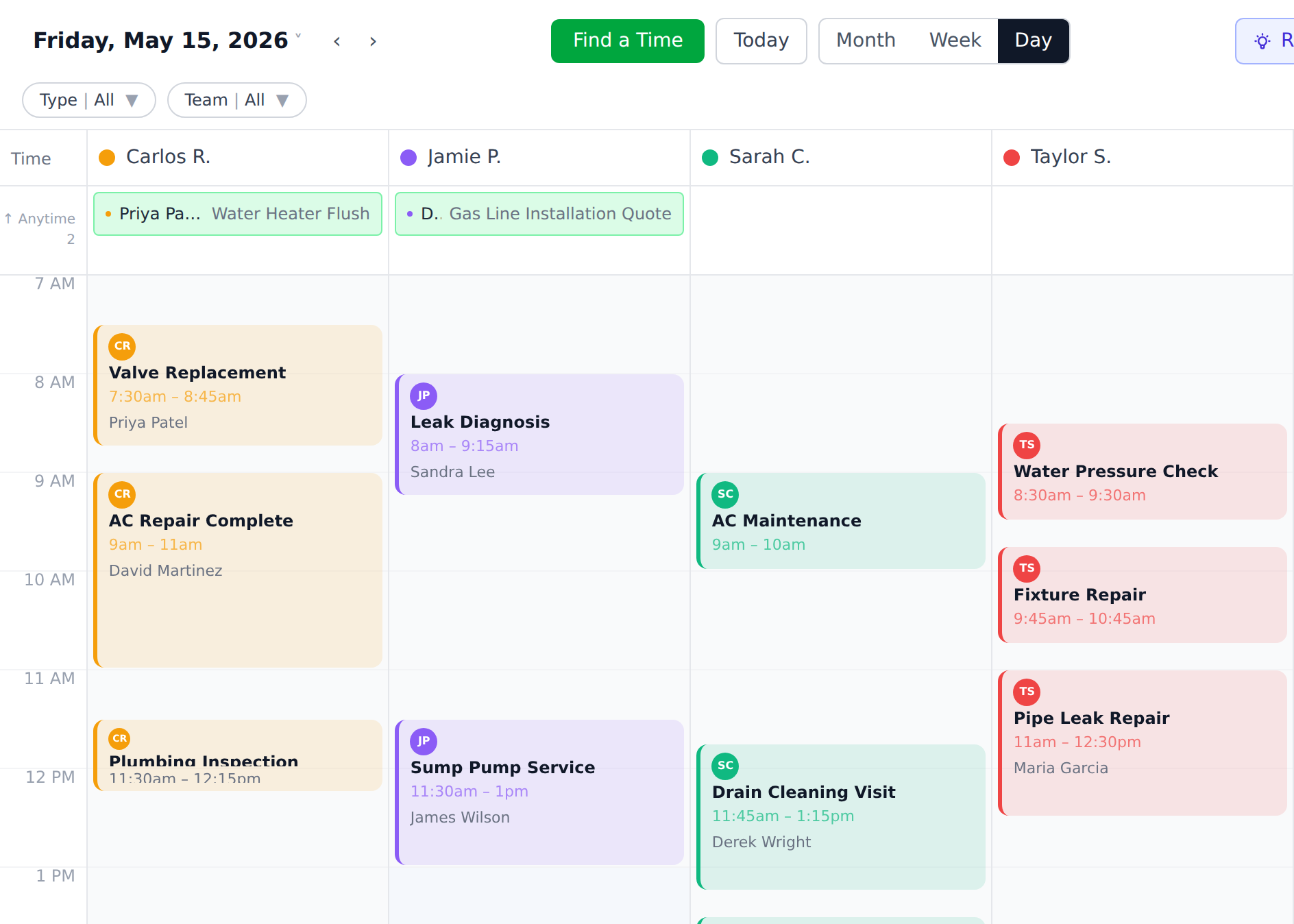
See the week by technician, then move work before the day breaks.
The first win is simple: every open job has a place, an owner, and a visible next move.
Ownership math
$349
Finished app, source package, guided AI setup, 19 guided setup walkthroughs, and no ServiceKit seat fees.
Monthly plans
Hosted software may be convenient, but plans, users, add-ons, and vendor access rules keep shaping the cost and control.
FAQ
ServiceKit launch list
$349 planned launch price. Finished app, guided AI setup, source you control, and no ServiceKit seat fees. Buying opens after the launch checks are complete.